The HP Sprocket Select portable photo printer bundle review is for anyone who wants to turn phone photos into tangible keepsakes without setting up a full-size printer.
Its larger-than-pocket-print format and creative extras suit casual scrapbooking, journaling, and sharing.
Sprocket Select Review Summary
The quick verdict
2,000+ ratings
Read Amazon ReviewsHP Sprocket Select
A good fit for phone photographers who want larger sticky-back prints and a ready-to-use kit for albums, decorating, and crafts.
- Prints 2.3-by-3.4-inch photos from a smartphone or social media.
- Compatible with iOS and Android devices and connects using Bluetooth 5.1.
- Uses ZINK zero-ink printing with glossy sticky-back paper; color is embedded in the paper rather than supplied by separate toner or ribbon.
- Paper is described as resistant to water, smudges, and tears.

Pros
- Larger 2.3-by-3.4-inch prints provide more space than smaller pocket-photo formats.
- Sticky-back sheets are convenient for journals, albums, and decorative projects.
Consider before buying
- The included paper pack contains 20 sheets, so regular printing will require buying more compatible paper.
- Prints remain compact at 2.3 by 3.4 inches and are intended for keepsakes and crafts rather than large photo displays.
Read the full review summary
The Sprocket Select prints 2.3-by-3.4-inch color photos from iOS and Android devices over Bluetooth 5.1.
Its ZINK paper embeds color in the sheet, so the printer does not need separate ink, toner, or ribbons; the paper has a glossy sticky back that can be used in albums, journals, or displays.
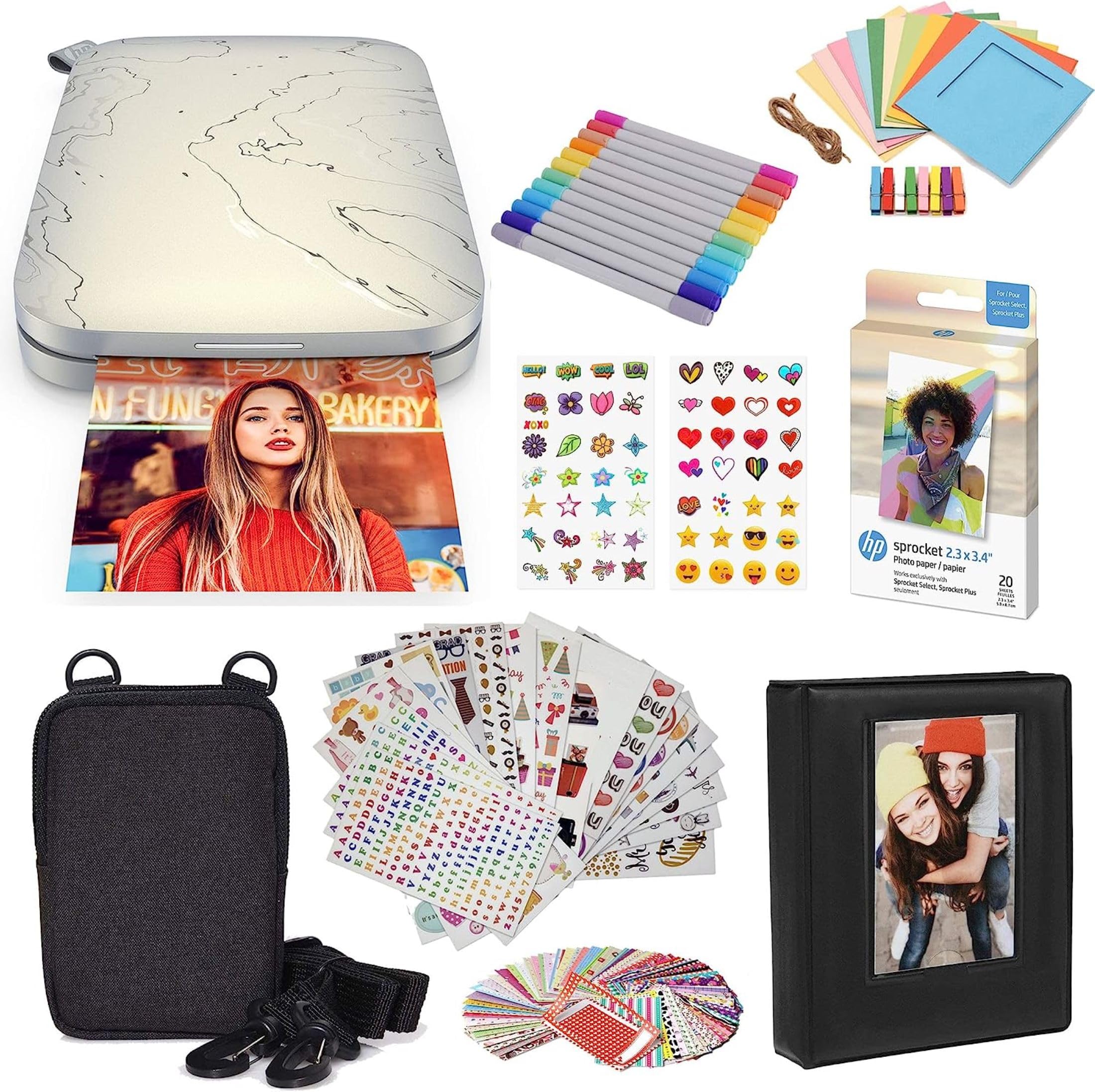
This bundle makes the most sense for people who will use the included 20-sheet pack, case, album, markers, sticker sets, and frames. The app adds editing tools, frames, filters, and a social-media hashtag-to-print feature.
Those touches make it a hands-on creative kit, though frequent printing means paper restocking will be part of ownership.
The buying factors
Sprocket Select Scorecard
Editorial scores reflect listed features and buyer fit; they are not laboratory measurements or customer ratings.
Print size
At 2.3 by 3.4 inches, prints are larger than the common 2-by-3-inch format and offer a bit more room for photos and captions.
Phone connectivity
Bluetooth 5.1 and support for iOS and Android make phone-based printing the clear central workflow.
Creative editing
The HP app provides frames and filters, plus augmented-reality features and the ability to scan doodles into custom stickers.
Paper convenience
ZINK paper avoids separate ink supplies, and the adhesive backing suits decorating and scrapbook use.
Bundle readiness
The included paper, case, album, markers, sticker sets, and frames cover several uses straight out of the box.
Long-session value
The included pack starts the project, but ongoing printing requires additional compatible photo paper.
Key Features and Specifications of Sprocket Select
- Prints 2.3-by-3.4-inch photos from a smartphone or social media.
- Compatible with iOS and Android devices and connects using Bluetooth 5.1.
- Uses ZINK zero-ink printing with glossy sticky-back paper; color is embedded in the paper rather than supplied by separate toner or ribbon.
- Paper is described as resistant to water, smudges, and tears.
- The HP app offers frames and filters, augmented-reality features, and a tool for scanning doodles to make custom stickers.
- A hashtag-to-print feature can send tagged social-media photos to the app for printing.
- Bundle contents include a 20-sheet paper pack, deluxe case, twin-tip markers, album, nine sticker sets, sticker frames, square hanging frames, and decorative stickers.
Pros and Cons of Sprocket Select
Pros
- Larger 2.3-by-3.4-inch prints provide more space than smaller pocket-photo formats.
- Sticky-back sheets are convenient for journals, albums, and decorative projects.
- No separate ink cartridges, toner, or ribbons are needed.
- The generous set of included creative accessories gives the printer several immediate uses.
- Phone compatibility and app-based editing make the workflow oriented around photos users already have.
Consider before buying
- The included paper pack contains 20 sheets, so regular printing will require buying more compatible paper.
- Prints remain compact at 2.3 by 3.4 inches and are intended for keepsakes and crafts rather than large photo displays.
- The workflow depends on a phone, the HP app, and Bluetooth, which may be less appealing to buyers who prefer printing from a computer or camera.
Who Should Buy Sprocket Select?
Good fit
Consider the Sprocket Select if you want a portable way to print phone photos for scrapbooks, journals, or small displays.
The 2.3-by-3.4-inch format is a useful middle ground for people who want more room than a tiny sticker print while keeping photos easy to handle.
The bundle is especially practical for a gift or a shared craft activity: it brings paper, a case, an album, markers, and several kinds of stickers and frames together.
Its app-based editing and social-media access also help turn casual snapshots into personalized projects without moving to a desktop workflow.
Before buying, think about how often you plan to print and whether adhesive-backed photos suit your projects. The starter paper is finite; for ongoing use, check that compatible Sprocket Select paper is readily available to you.
Who should skip it
Skip this model if your main goal is standard-size prints for framing or large, detailed photographs. Its compact 2.3-by-3.4-inch output is designed for portable keepsakes.
It may also be a poor match if you want a printer for computer-based work or high-volume printing. The described workflow centers on a smartphone, app, and small sheets of specialty paper.
How the HP Sprocket Select Fits Everyday Photo Projects
A more usable pocket-print format
The 2.3-by-3.4-inch sheet gives each image more area than a 2-by-3-inch print, which can help when photos are going into a journal or being passed around.
It is still a small format, so buyers should picture it as a hands-on keepsake rather than a replacement for conventional photo printing.
ZINK paper shapes the ownership experience
With ZINK, the color is embedded in the paper, eliminating separate ink, toner, and ribbon supplies.
The adhesive backing makes prints easy to place, but buyers should factor specialty paper into the ongoing cost and confirm they can source the right size before making it a regular hobby.
The app adds creative steps, not just printing
Frames, filters, augmented-reality features, and doodle scanning give users ways to personalize images before they leave the printer. The hashtag-to-print option can also shorten the path from a social photo to a physical one.
These features are most useful to people who enjoy editing and decorating; someone who wants a simple archival print may not use much of the app toolkit.
The bundle is geared toward making things
The paper, markers, album, sticker sets, and frames make this more than a bare printer purchase. They encourage immediate use for scrapbooks, journals, and wall displays, while the case helps keep the kit together.
This assortment is a stronger fit for a creative routine or a gift than for buyers who only need a printer and prefer to choose accessories separately.
Alternatives to Sprocket Select
Portable Photo Printers alternative

25,000+ ratings
Read Amazon ReviewsHP Sprocket Select Printer
Choose the reviewed bundle if the album, markers, sticker sets, and frames are useful to you.
The other Sprocket Select is a more direct option if you want the same core printer format and app workflow without the listed craft assortment.
- This Sprocket Select option shares the 2.3-by-3.4-inch ZINK print format, Bluetooth 5.1, phone compatibility, and HP app features, while its described package focuses on the printer and travel-oriented design details.
- The reviewed bundle includes the Sprocket Select printer, a 20-sheet pack, and an extensive set of craft accessories.
NFC pairing alternative
20,000+ ratings
Read Amazon ReviewsKODAK Step Instant Smartphone Photo Printer
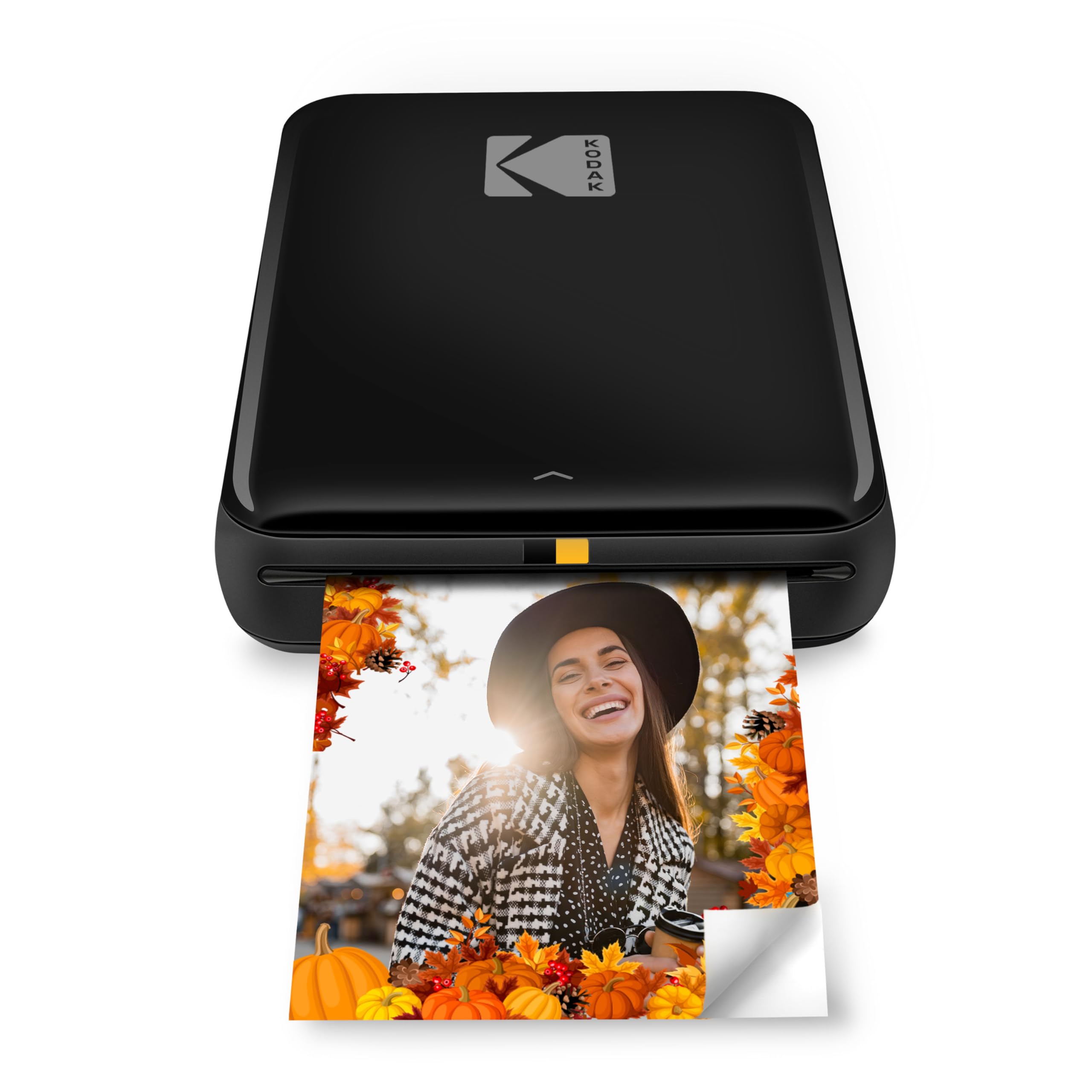
Consider the KODAK Step if a smaller 2-by-3-inch print and Bluetooth or NFC connection options suit your routine.
The Sprocket Select is the better fit when you prefer its larger print size and want the included album and craft materials.
- The KODAK Step prints 2-by-3-inch ZINK photos, supports iOS and Android through Bluetooth or NFC, and offers app-based collages, filters, borders, stickers, and text.
- Its description gives an approximate output of 25 photos per charge.
- The Sprocket Select uses 2.3-by-3.4-inch sticky-back paper and emphasizes HP app features and bundled craft accessories.
Is Sprocket Select Worth It?
The HP Sprocket Select is worth considering if your goal is small, personalized prints for albums, journaling, and decorating.
Its larger pocket-photo size, phone-centered app tools, and sticky-back ZINK paper make that use case straightforward, while the bundle supplies a useful set of creative accessories.
Buy it if you expect to use those extras and are comfortable replenishing specialty paper over time. Choose another kind of printer if you need larger prints, computer-first workflow, or a format aimed at conventional photo display.
Your review at a glance
2,000+ ratings
Read Amazon ReviewsHP Sprocket Select
A good fit for phone photographers who want larger sticky-back prints and a ready-to-use kit for albums, decorating, and crafts.
- Prints 2.3-by-3.4-inch photos from a smartphone or social media.
- Compatible with iOS and Android devices and connects using Bluetooth 5.1.
- Uses ZINK zero-ink printing with glossy sticky-back paper; color is embedded in the paper rather than supplied by separate toner or ribbon.
- Paper is described as resistant to water, smudges, and tears.